Skyview Suites
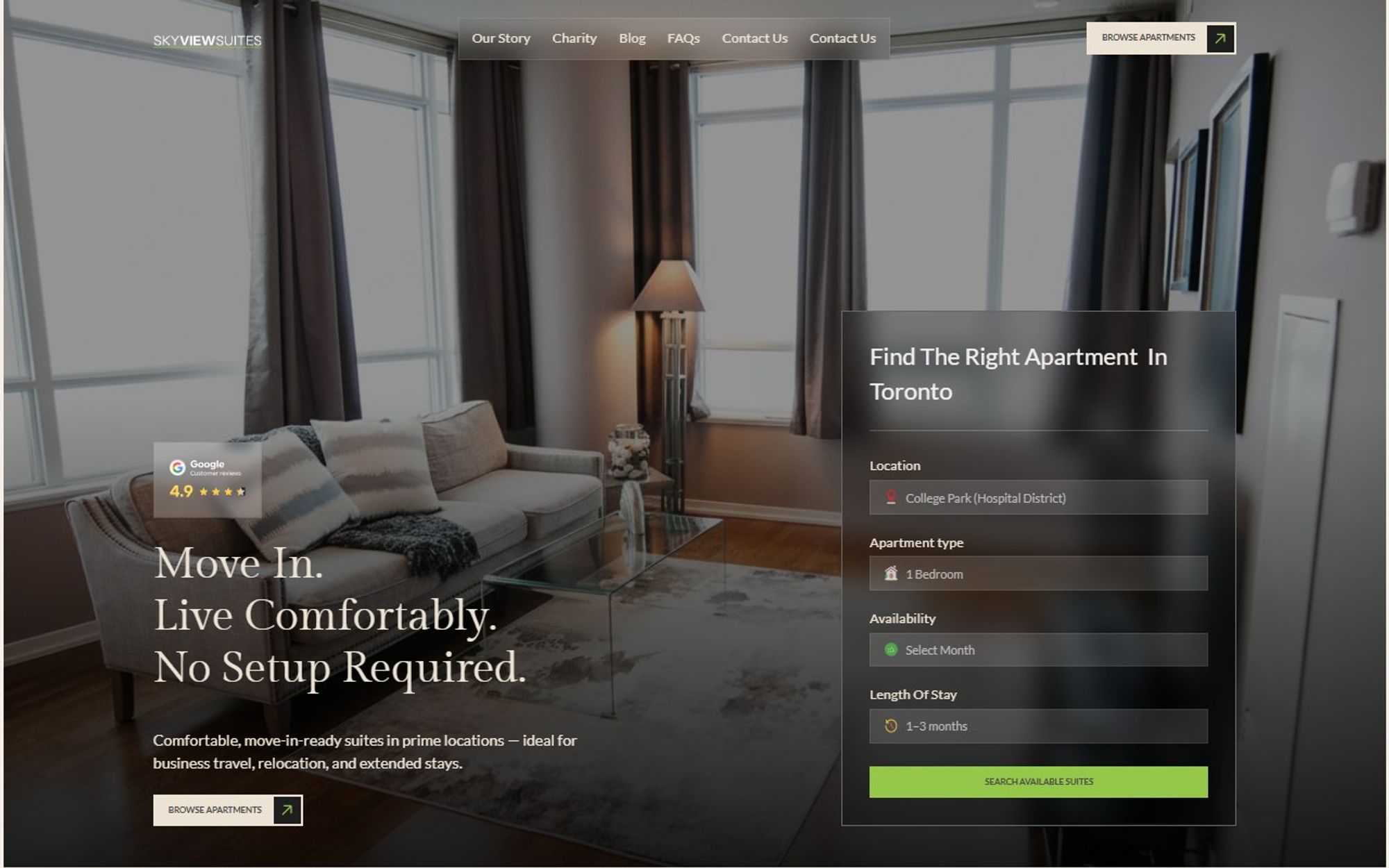
A redesign for Skyview Suites, furnished apartments across Toronto, built around the first question every renter asks: where could I live?
- Client
- Skyview Suites
- Industry
- Furnished rentals
- Services
- Figma design, Webflow development
- Tools
- Figma, Webflow, Client First, GSAP, Lenis, Swiper
The site route
- 01Browse apartments
- 02Our story
- 03Charity
- 04Blog
- 05FAQs
- 06Contact
Where it started
Skyview’s original site (skyviewsuites.com, which now opens as torontofurnishedrentals.com) starts with a carousel of listings under an eight-link menu, with search split between a map button and a list button. We rebuilt the first impression around one search and the neighbourhoods themselves, so renters understand the offer and where they could live before they compare a single suite.
Original site: skyviewsuites.com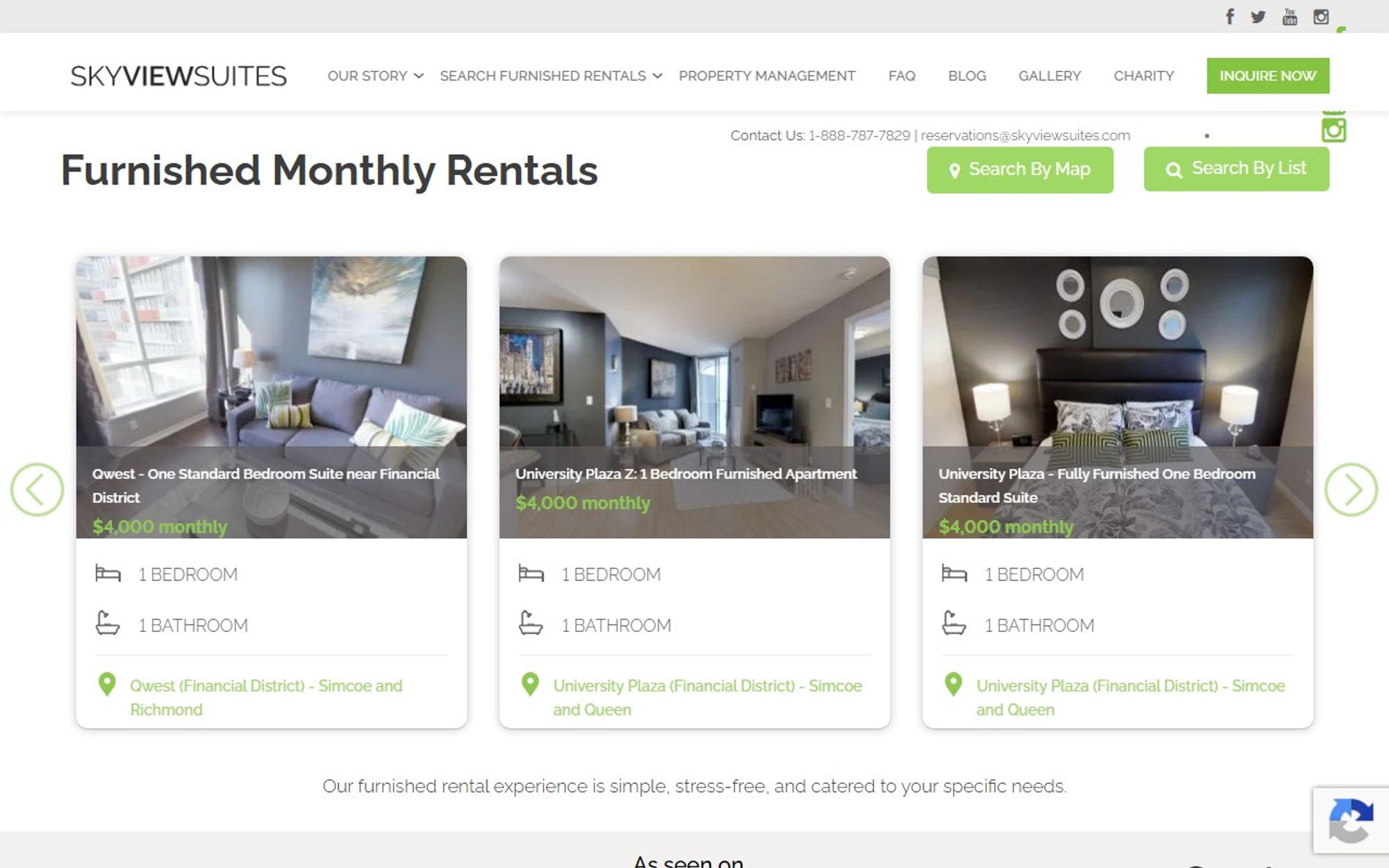
The brief
Skyview rents move-in-ready suites across Toronto neighbourhoods, from King West and the Waterfront to the Financial District and Yonge–Sheppard. The redesign had to make comparing locations quick and turn browsing into an enquiry with as little friction as possible.
Our approach
We started from what a renter needs to decide: where they could live, what is included and how to get in touch. We designed the homepage around those three questions in Figma, then built it in Webflow with Client First naming, so the team can edit it without breaking the layout, plus smooth scrolling and light motion with Lenis and GSAP.
What we did
We designed the new site in Figma around a search-first hero and one clear promise, move in with no setup required, followed by neighbourhood-led browsing and clear suite details. Then we built it in Webflow, responsive on every screen.
What it does
The features that do the work for visitors and for the business.
Search first
“Find a suite that fits your stay” leads the page, so renters start where they want to be.
Virtual tour
A walk-through of one of the furnished rentals before anyone has to visit.
Featured homes
Suites available now, shown with what matters for a stay.
Who it is for
A section that speaks to the kinds of renters Skyview serves.
Four simple steps
A short guide from finding a suite to moving in.
Questions and contact
An FAQ and a contact form on the homepage.
What changed
Area by area, what the original site did and what the redesign does instead.
- First impression
- BeforeOpens on a carousel of individual listings. The homepage has no main heading.
- AfterOpens on one clear promise, “Move in. Live comfortably. No setup required.”, then “Find a suite that fits your stay”.
- Navigation
- BeforeA long menu, with 16 links in its dropdowns, from careers and data studies to subway and price maps.
- AfterFive links: Our story, Charity, Blog, FAQs and Contact.
- Reassurance
- BeforeListings first, with a single line about the service under them.
- AfterSections for who it is for, what is included and why choose them, before the featured homes.
- Path to an enquiry
- BeforeSearch split between “Search by map” and “Search by list”, plus an “Inquire now” button.
- AfterA four-step guide to getting your apartment, answers to common questions and a contact form on the page.
The result
A calmer, more confident site where each neighbourhood gets its own moment and every suite is one short step from an enquiry.
Start a project
Tell us what you need and when you need it live. We reply with honest advice and a fixed price, and if we are not the right fit, we will say so.
Book a discovery call
A free 30 minute video call. Talk it through before you commit to anything.
Pick a time